Your story,
saved.
Add your profile and resume. Save answers to recurring questions. Update them whenever your story changes.
 Apply XExplore Apply X ↗
YOUR NEXT CHAPTER STARTS HERE
Your ambition deserves more than another form.
Meet the workspace that keeps your job search moving.
Built for Chrome. Designed around you.
MAKE ROOM FOR WHAT MATTERS
You've already told your story.
Apply X helps you stop typing it over and over.
Save your profile. Fill supported applications.
Review every detail. Keep your progress in sight.
ONE PROFILE. MORE MOMENTUM.
Your experience, education, preferences and resumes. Ready when the next opportunity is.
Keep your details current and choose the resume for each opportunity.
Actual extension screen · Example data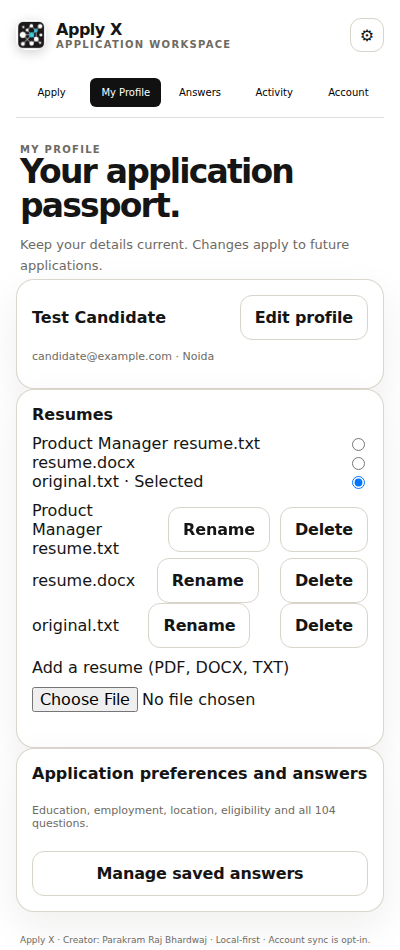
FOR THE DAYS YOU KEEP GOING
Set a 30, 60 or 90-day goal. Keep your application history organised. Build a streak with confirmed applications.
Progress you can see.
A routine you can return to.
Goals are plans, not job guarantees.
FROM INTENTION TO ACTION
Add your profile and resume. Save answers to recurring questions. Update them whenever your story changes.
Open a supported job application, use autofill, and check your details before submitting. Site support varies.
Track applications and follow-ups. Set goals and enable local reminders to keep your search moving.
YOUR INFORMATION. YOUR CHOICES.
Your saved profile and resume stay in your browser by default. Local features work without registration. Optional account sync requires a configured service and your action.
Read our privacy policy ↗A FEW THINGS TO KNOW
Support depends on the site's form structure. Apply X helps fill supported fields; custom widgets and unusual forms may need manual input. Always review your application.
No. Profiles, local application tracking and goals work without an account. The current release has no account service preconfigured.
Yes. Edit your profile, manage your resumes and update saved answers in the extension. Changes apply to future autofill; previously submitted applications remain with the employer.
Streaks use confirmed real applications in your selected timezone. Test and self-reported applications do not count. Reminders are optional Chrome notifications and depend on Chrome running and notification permissions.
The Chrome Web Store listing is being prepared. For release information, contact applyxcompany@gmail.com. This website will link to the official listing when it is live.
MAKE SPACE FOR YOUR NEXT CHAPTER